 ObjectDock 2.1
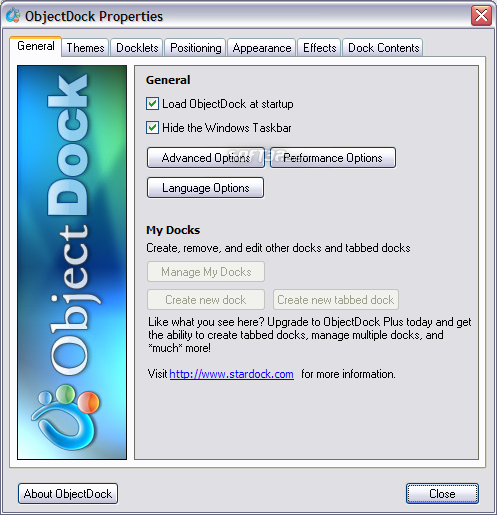
ObjectDock is a free program that allows you to have a nice animated launchbar/taskbar on your screen that reacts to your mouse when you mouse over it. Organize your short-cuts and running tasks onto this customizable dock.
Last update
2 Aug. 2013
| old versions
Licence
Free to try
OS Support
Windows 2000, Windows XP, Windows Server 2003, Windows Vista, Windows 7, Windows 7 x64, Windows Vista x64, Windows XP x64, Windows 8
Downloads
Total: 66,577 | Last week: 15
Ranking
#3 in
Others
Publisher
Stardock Systems
Screenshots of ObjectDock


ObjectDock Editor's Review
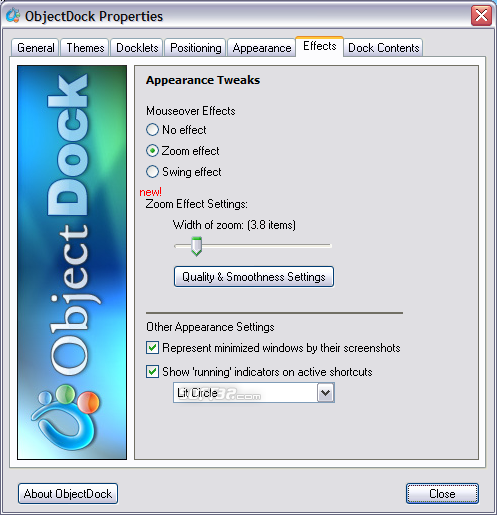
These days there are many third party utilities that enhance the functionality of your desktop. Objectdock is one of those programs. It's very similar to the dock displayed on computers running Mac OS. The program adds a customizable shortcut bar, which supports drag and drop. It can also be set to show the running programs, just like the normal Windows taskbar.You can even hide the Windows taskbar and use this program instead. Various animations of your dock objects are available. You can set the icons on your dock to zoom or spin when you move your mouse over them. The program also supports themes. Themes as well as docklets can be downloaded from the publisher's website. Docklets are small applications created for Objectdock. They enhance the usability of the dock by adding new features like battery life, clock, weather conditions display, Google search, and others.
Two sizes can be defined for the icons. You can set the size of the icons when they are displayed normally as well as their size when you move your mouse over them. Transparency level adjustment is also supported. The thing I like most is that the program can represent each minimized window by its screenshot.
Pluses: The program is very nice looking. It also is easy to configure. Memory usage can be configured by using the program's options menu. It can be set to use as few as 4 MB of your memory.
Drawbacks / flaws: If you replace your default Windows taskbar with this program you won't have access to your system tray icons anymore. You can install a plug-in to make them visible, but the one that I found displayed only some of my tray icons. The permanent solution is to buy this software and you'll have to access a couple of extra features including the system tray.
In conclusion: I like this program very much so I decided to use it. I normally don't use this kind of software but I'll make an exception for this one. It's free so you are more than welcome to try it too.
version reviewed: 1.5
ObjectDock Publisher's Description
ObjectDock is a program that acts as both a task manager and a program launcher. It lets you organize your short-cuts and running tasks onto an extremely customizable dock that sits on your desktop. Users can customize the look of each item on the dock and set various animation options for when the mouse is over an item on the dock. It is very easy...
Read moreOther Languages
Look for Similar Items by Category
Feedback
- If you need help or have a question, contact us
- Would you like to update this product info?
- Is there any feedback you would like to provide? Click here
Beta and Old versions
Popular Downloads
-
 KaraFun Karaoke Player
2.6.2.0
KaraFun Karaoke Player
2.6.2.0
-
 Kundli
4.5
Kundli
4.5
-
 Macromedia Flash 8
8.0
Macromedia Flash 8
8.0
- FastSum 1.9
-
 FastSum Standard Edition
1.6
FastSum Standard Edition
1.6
-
 Cool Edit Pro
2.1.3097.0
Cool Edit Pro
2.1.3097.0
-
 Cheat Engine
6.8.1
Cheat Engine
6.8.1
-
 Hill Climb Racing
1.0
Hill Climb Racing
1.0
-
 GeoGebra
5.0.44
GeoGebra
5.0.44
-
 My Talking Tom
1.0
My Talking Tom
1.0
-
 Tom VPN
2.2.8
Tom VPN
2.2.8
-
 C-Free
5.0
C-Free
5.0
-
 Windows XP Service Pack 3
Build...
Windows XP Service Pack 3
Build...
-
 Facebook Messenger
440.9.118.0
Facebook Messenger
440.9.118.0
-
 Netcut
2.1.4
Netcut
2.1.4
-
 Vector on PC
1.0
Vector on PC
1.0
-
 Vidnoz AI
1.0.0
Vidnoz AI
1.0.0
-
 Auto-Tune Evo VST
6.0.9.2
Auto-Tune Evo VST
6.0.9.2
-
 Hindi Typing Master
1.5.0.0
Hindi Typing Master
1.5.0.0
-
 FormatFactory
4.3
FormatFactory
4.3